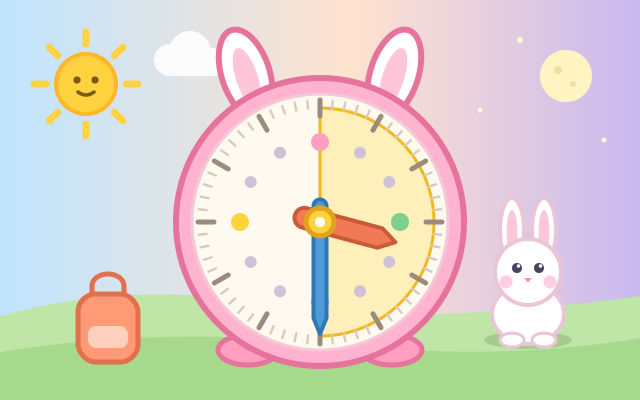
A game for learning to read a clock. In the middle sits a big clock with bunny ears, and Bunny has things to do all day: wake up, eat breakfast, walk to school, play in the park, take a bath, go to bed. Turn the long hand with your finger and the short hand follows slowly, just like a real clock. Set the time the question asks for (such as "half past seven") and press Done. The little town above changes with the time too: sunshine in the morning, an orange sky at sunset, and the moon and stars at night.
There are three kinds of question: set the clock to a time in words, read the clock and pick the right time from three cards, and elapsed-time questions such as "At half past three Bunny starts to play in the park. What time is it 45 minutes later?", where a yellow wedge shows how much time has passed as you turn. The wrong cards are the mistakes children really make, such as reading the short hand as the next number or mixing up the two hands.
There are five days, each adding a little more: o'clock, half past, quarter past and quarter to, every five minutes, and how long. The six scenes of each day are generated from Bunny's routine and always move forward through the day. After that there is Random practice, plus a Free clock where you can turn the hands and watch the sky change. Times are said the way each language says them: 三點半 in Chinese, half past three in English and さんじはん in Japanese.
How to play
- Press "Play!", or choose a day in "Pick a day" (O'clock, Half past, Quarter past & to, Five by five, How long?).
- Read the speech bubble: what Bunny is doing and what time to set. The short hand (orange, short and chunky) shows the hour; the long hand (blue, long and thin) shows the minutes. The small numbers 5, 10, 15 … around the rim tell you how many minutes the long hand is pointing at.
- Press and turn around the clock to move the hands, or use the buttons below: orange moves one hour, blue moves 5 minutes. Then press Done. If it isn't right yet, Bunny tells you what time the clock shows and circles the number each hand should point to. Just try again.
- Reading questions: tap the card that shows the time on the clock. If you pick the wrong one, the bubble explains where each hand is pointing.
- How long?: the clock starts at the start time. Turn it forward (clockwise) by the number of minutes in the question. The yellow wedge is the time that has passed.
- Stuck? Press the light-bulb Hint: dotted hands appear for you to match, or the right card glows. Hints are unlimited. Finish all six scenes to see Bunny's timetable for the day.
Controls
- Phone / tablet: press on the clock and move your finger around it to turn the hands. Start near the short hand to turn the short hand, anywhere else to turn the long hand; both move together like a real clock. The buttons below work too: orange for the short hand (one hour at a time) and blue for the long hand (5 minutes at a time). Then press the green Done button. When the question asks you to read the clock, tap one of the three time cards.
- Mouse: click and drag around the clock, or use the buttons below it.
- Keyboard: ← → move the long hand back / forward 5 minutes, ↑ ↓ move the short hand forward / back an hour, Enter or Space for Done or Next, 1–3 pick a card, H for a hint, Esc for the menu.
For parents
- Designed for ages 6–8 and fine for 9–12. Children practise reading an analog clock (the short hand for the hour, the long hand for the minutes, five minutes per number), match spoken time phrases to the clock face, and on the last day work out elapsed time. Because the short hand moves with the long hand, they can see that one full turn of the long hand moves the short hand one number, and the changing sky helps connect times with morning, afternoon and night.
- No timer and no failure: a wrong answer just gets a gentle "it's now …" with the target numbers circled, and dotted guide hands appear after two tries. Hints are unlimited and cost nothing. Questions are generated from a daily routine, so every play is different. The "Read it to me" button reads the question aloud using only voices installed on the device, so the text never goes online; it is hidden when the device has no local voice for the language.
- No chat, in-app purchases, ads or outbound links, and nothing to type in. Finished days and the sound setting are stored only in this device's browser; sound can be turned off.