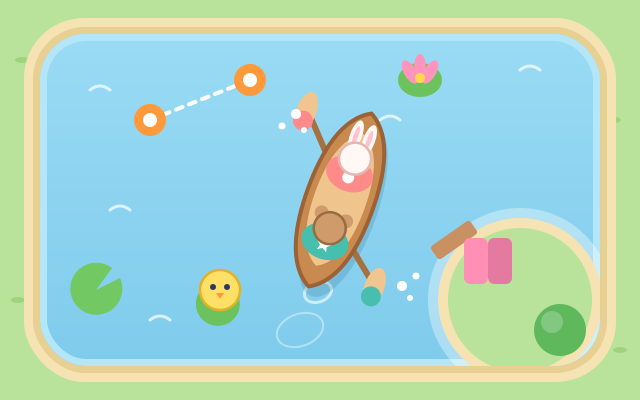
Bunny and Bear share one canoe: Bunny sits in front with the left paddle, Bear sits behind with the right paddle. The left half of the screen is Bunny's paddle and the right half is Bear's, so two players share one phone or tablet and each looks after one side.
Paddle on one side and the canoe turns (the left paddle swings it right, the right paddle swings it left). Paddle at the same time and it goes straight, with a "Together!" boost that makes it faster. Where to go and when to turn is something the two players have to agree on and time together.
Every lake is generated fresh: go through numbered buoy gates in order, pick up little animals waiting on lily pads and take them home to their own dock, and collect lotus flowers along the way. Later levels add islands, rocks, narrow channels and a current that pushes the canoe sideways. There are 12 levels, and after that new lakes keep coming.
Teamwork is the heart of it, but you can play alone too: one thumb on each side, as if you were both paddlers at once.
How to play
- Tap Let's go! to start. The first time, a "How do we paddle?" page explains the controls; tap Got it! when you're ready.
- The left player taps the left half of the screen (Bunny's paddle) and the right player taps the right half (Bear's paddle). Tap for one stroke, or hold to keep paddling.
- To go straight, both tap together. To turn right, paddle only on the left; to turn left, paddle only on the right. The curved arrow on each paddle button shows which way that side turns the canoe.
- The bar at the top says what to do next (go through a gate, pick someone up, take someone home). When the target is off screen, an orange arrow at the edge points to it.
- If nobody has paddled for a while, or the canoe is heading the wrong way, the side to paddle lights up with "Paddle here" or "Paddle together".
- Bumping into the shore or a rock only bounces the canoe gently, and there is no time limit. Finish every task to clear the level, then choose the next level, play again on a brand-new lake, or go back to the menu.
Controls
- Phone / tablet: tap the left half of the screen to paddle left and the right half to paddle right; hold to keep paddling. Two players can tap at the same time, one on each side. On your own, use both thumbs.
- Mouse: click the left or right half of the screen to paddle on that side; hold the button to keep paddling.
- Keyboard: A or ← paddles left, L or → paddles right, Space paddles both. Esc / P to pause, Enter to start or go to the next level, M to mute.
For parents
- Made for ages 6–12, mainly 6–8. This is the site's first same-device co-operative game: two children sit side by side with one phone or tablet and have to talk it through ("where are we going?", "paddle together now!"), practising turn-taking, timing and coordinating with words. It also builds left/right and turning sense (paddling on the left turns the canoe right). Played alone, it is a two-handed coordination exercise.
- There is no way to fail and no timer. Bumping the shore or a rock just bounces the canoe gently, and it never tips over; if the canoe heads the wrong way, the side to paddle lights up. Every level is a newly generated lake, so it can be replayed again and again.
- The two paddlers are told apart by their position and fixed marks (Bunny ●, Bear ★) as well as colour, and each animal is matched to its home by its face, so no colour-matching is needed. There is no chat, no in-app purchases, no ads, no outbound links and no online leaderboard, and no name or personal details are ever asked for. Level progress, lotus records and the sound setting are stored only in this device's browser. The game pauses itself when you switch tabs.