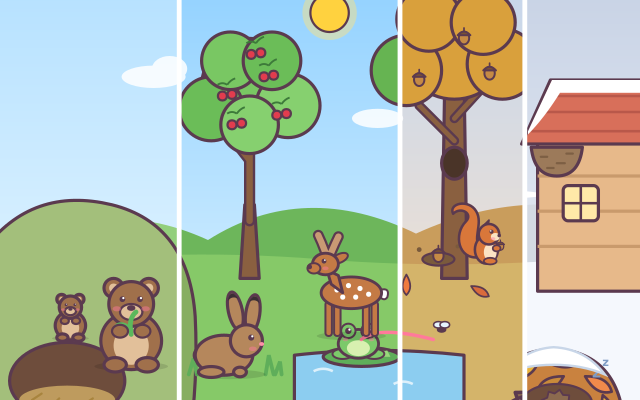
The screen is a forest: a hill with a den, a cherry tree, an oak, a pond, a little cabin and a pile of leaves, home to a bear, swallows, a squirrel, a hare, a frog, a hedgehog and a deer. Along the bottom runs a timeline of the year from spring to winter. Drag it and the forest changes with it: the sky and ground change colour, cherry blossoms come and go, leaves turn red and fall, snow arrives and the pond freezes, and every animal does what it really does in that season.
Each diary page gives a photo task, such as "Snap the bear hibernating in its den" or "Snap the squirrel burying acorns". Children first think about which season that happens in, slide the year there, then tap the animal to take its photo. A correct photo goes into the diary with a short fact card. A different photo is never wrong: it is still saved in the nature diary, the game explains what the animal is doing right now, and it suggests trying another season or another animal.
Three books get gradually harder: "Season clues" tells you the season, "Animal tasks" leaves the season to you, and "Riddles" gives only a first-person riddle, so children must work out who it is and when. The 31 photos cover hibernation (bear, frog, hedgehog), migration (swallows arrive in spring and leave in autumn), changing coats (the hare's white winter fur, the deer's spotted summer coat), food storing (squirrel), new babies (bear cub, swallow chicks, tadpoles, baby hedgehogs), antlers falling off and regrowing, and a tree through the year.
How to play
- Tap "Take photos!" and choose one of three books: "Season clues" is the easiest and "Riddles" the hardest.
- Read the task card at the top: who to photograph and what it should be doing. In the first book a coloured tag also tells you the season.
- Drag the timeline at the bottom left or right (or use ‹ ›). The badge in the top-left corner of the forest shows the season and month.
- When you see the right moment, tap that animal to take a photo. If it is correct, tap "Into the diary" for the next task. Each book has 5 tasks and earns a season stamp.
- A different photo shows an explanation and a hint. After 2 tries, the months where the photo can be taken glow on the timeline; after one more, the animal you need glows too.
- The green book button opens the nature diary. Every new scene you photograph (31 in all) is saved there, and empty spaces show season icons hinting where to look.
Controls
- Phone / tablet: drag the timeline at the bottom left or right to change the month; it settles on the nearest month when you let go. You can also tap a spot on the timeline, or use the ‹ › buttons to move one month at a time.
- Tap an animal (or the cherry tree) in the forest to take its photo.
- Mouse: drag or click the timeline, and click an animal to take a photo.
- Keyboard: ← → or A / D change the month; number keys 1–8 or Tab pick an animal and Enter takes the photo; Esc closes a window or returns to the title.
For parents
- Made for ages 6–8, and useful as a nature-study review for 9–12. Children first think "which season does this happen in?" and then slide the timeline to check, linking seasons with animal behaviour. The forest follows a temperate Northern Hemisphere year (as in Japan, Korea, Europe or mountain forests in Taiwan): spring is March to May and winter is December to February. In the Southern Hemisphere the months are the other way round, which makes a nice talking point.
- Things to discover include: bears, frogs and hedgehogs hibernate, but squirrels do not and live on the acorns they hid in autumn; swallows are migrating birds that return to nest in spring and fly south in autumn; the hare turns white in winter and the deer has white spots in summer; a stag's antlers drop off every spring and grow back; frogs grow from eggs to tadpoles to frogs. Try asking "Why does the bear eat so much in autumn?" or "What happens to the acorns the squirrel forgets?"
- There is no losing, no timer and no score to lose: even a "wrong" photo is kept in the diary with an explanation, and after a few tries the timeline and the animal glow as hints. There is no chat, no in-app purchases, no ads and no outbound links, and no name or personal information is ever asked for. Only the photos taken, the task stamps and the sound setting are remembered, in this device's browser (the game still works if saving is blocked). Sound can be switched off with the speaker button, and the game also works offline.