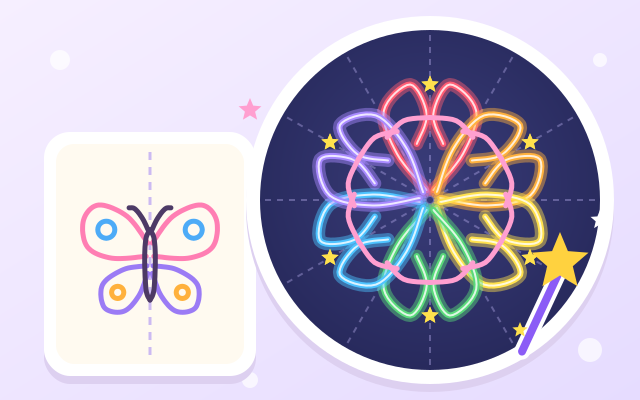
A drawing board with a bit of magic: draw freely with your finger and every line is copied straight away by a "magic mirror". Draw half a butterfly on the left and the other half grows on the right. Switch to a kaleidoscope and one line becomes 12 or 16, so any scribble turns into a pretty window pattern.
There are 8 mirrors: left & right, four ways, kaleidoscope 3, 6 and 8, pinwheels 3 and 5 that only turn (no mirroring), and a plain no-mirror mode. Dotted mirror lines show where the mirrors are, and while you draw, little rings show where each copy of your line will appear.
Ten colors (including rainbow), crayon, glow pen, dots, stars and an eraser, three sizes and four paper colors. Out of ideas? Open an idea card (butterfly, kitty face, robot, rocket, snowflake, five petals, eight-point window, clover), trace half along the dotted line and watch the other half appear, while learning where symmetry shows up in real life. Tap "Save to gallery" to keep a picture on this device, and use "Magic replay" to watch it being drawn again line by line.
How to play
- Tap "Let's draw!" and draw on the canvas with your finger. Watch the magic mirror copy your line into the matching places.
- Tap the purple mirror button at the top to pick a magic mirror (left & right, four ways, kaleidoscope, pinwheel…). New lines follow the new mirror; lines you already drew stay as they are, so you can mix them.
- Tap a color and a brush at the bottom; the dot button on the right changes the size. Made a mistake? Tap Undo, or use the eraser (it is mirrored too).
- Not sure what to draw? Tap the yellow light bulb for an idea card and trace half along the dotted line.
- When you like your picture, tap the pink frame to save it to your gallery. The "⋯" button has paper colors, hiding the mirror lines, magic replay and new paper.
Controls
- Phone / tablet: draw on the canvas with one finger; tap a color and a brush at the bottom, and the purple button at the top to change the magic mirror.
- Mouse: hold the left button and drag to draw.
- Keyboard: arrow keys move the pen, Space puts it down / lifts it; 1–9 and 0 pick a color, B changes brush, [ ] changes size, M changes mirror, I opens idea cards, S saves to the gallery, Ctrl+Z or Backspace undoes, Esc goes back.
For parents
- Made for ages 6–8 (little ones can scribble freely; 9–12s can try detailed kaleidoscopes and tracing). By drawing one line and watching it get copied, children get an intuitive feel for left-right, up-down and rotational symmetry (including the difference between mirroring and just turning), while practising finger control and composition.
- A purely creative activity: no right or wrong, no score, no losing and no timers. There is no chat, no in-app purchases, no ads and no outbound links, and no name or personal information is ever asked for.
- Gallery pictures and the drawing in progress are kept only in this device's browser (up to 12 pictures; the game still works if saving is blocked) and are never uploaded. "New paper" and "Remove this one" ask first, so a stray tap won't wipe a picture. Sound can be switched off on the title screen or under "⋯".