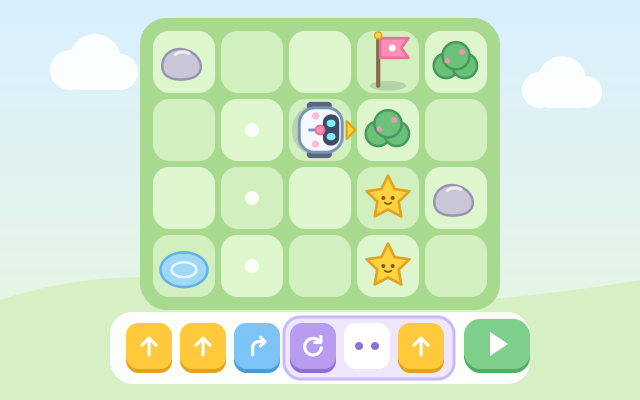
A first taste of coding for kids. A little robot sits in a grid garden with some stars and a flag. It won't move on its own: you line up command cards such as Forward, Turn left and Turn right, then press Run, and the robot follows them one by one while the current card lights up.
The heart of it is plan, run, watch, fix. Left and right are the robot's own left and right, so when it faces down they are the opposite of the screen's. If the robot bumps into a rock, bush or puddle, or the program ends before the flag, it simply stops; the card where things went wrong glows, and one tap sends it back to the start so you can change the program.
There are 30 levels in five stops: Step and turn, Star hunt, Repeat cards, Repeat patterns and Command master. From the third stop there is a Repeat card and a card limit, so repeated moves (a long straight line, or a "forward, left, forward, right" staircase) have to go inside a repeat box for the program to fit. Every garden is laid out along the route of a reference program written by the game first, so every level can be solved. After that, Random challenge (Easy, Medium, Hard) builds a new garden every time.
How to play
- Tap "Play!", or choose a level from "Levels".
- Check which way the robot faces: its eyes and the little yellow arrow point the way "Forward" goes.
- Tap the cards at the bottom to add commands to "My program" one by one. Forward moves one square; Turn left and Turn right only turn on the spot, using the robot's own left and right. Tap a card in the program to remove it, or use the bin at the top to clear everything.
- Press Run. The robot follows the whole program; collect every star and reach the flag to clear the level. If it bumps into something or stops short, the card where it went wrong glows. Press "Back to start" (or just change a card) and try again.
- Levels with the Repeat card: tap Repeat to add a repeat box, and the next cards go inside it. Tap "×3" to change the count (2 to 9), and tap the dashed "+" after the box to add cards at the end again. Tapping the purple card on the left of a box removes the box but keeps its cards. The numbers at the top right show cards used / cards allowed.
- Stuck? The light-bulb Hint adds the next correct card (or fixes the program from that point on), as often as you like. Clear a level with the fewest cards to earn a crown.
Controls
- Phone / tablet: tap the cards at the bottom (Forward, Turn left, Turn right, Repeat) to add them to "My program", and tap a card in the program to take it out. Tap "×3" on a repeat box to change the count, and tap a dashed "+" to choose where new cards go. Then press the green Run button.
- Mouse: click, just like touch.
- Keyboard: ↑ (or W, F) forward, ← (or A) turn left, → (or D) turn right, R adds a repeat box, + / - change the repeat count, T switches where new cards go, Backspace removes the last card, Enter or Space runs, H for a hint, C clears all, Esc for the level list.
For parents
- Designed for ages 6–8 and fine for 9–12. It practises the basics of computational thinking: breaking a goal into a sequence of steps, working out left and right from someone else's point of view, watching a program run to find what went wrong (debugging), and wrapping repeated moves in a loop. The first two stops use only Forward and turns; Repeat and the card limit come in the last three, where older kids get a real challenge finding the shortest program.
- No timer and no failure: bumping into something or stopping short just pauses the robot, highlights the card in question and offers a one-tap return to the start. Every level is generated from a reference program, so it is always solvable; hints add or fix the next card, are unlimited and cost nothing. The crown only means "fewest cards"; there are no scores or rankings.
- No chat, in-app purchases, ads or outbound links, and nothing to type in. Progress, best card counts and the sound setting are stored only in this device's browser; sound can be turned off.