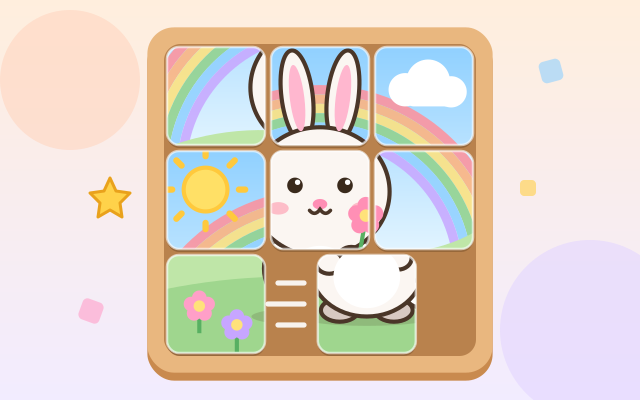
The classic sliding-tile puzzle, with cute pictures instead of numbers. A picture is cut into equal square tiles and the bottom-right one is taken out, leaving a gap. Slide tiles into the gap one by one until every tile is back home; then the last piece pops into place.
All tiles have exactly the same shape, so you work from the picture itself: where the animal's ears, eyes and feet are, and which corner holds the sun, the rainbow, the palm tree, the moon or the snowman. Every picture is drawn by code, with 8 animals (kitty, bear, bunny, panda, frog, chick, piglet, fox) and 4 scenes (rainbow meadow, sunset beach, starry night, snowy hills).
There are 18 levels in three sets: a 3×3 warm-up, longer 3×3 and 3×4 pictures, and a 4×4 sixteen-tile challenge. Every level is scrambled from the finished picture using legal slides, so it can always be solved, and its fewest-moves count is worked out in advance; later levels need more moves. A finished level's button turns into a little photo of its picture. After that, Random Puzzle (Easy, Medium, Hard) makes a new picture and a new mix every time.
How to play
- Tap "Play!", or choose a level from "Levels".
- Find the gap. Tap a tile right next to it and the tile slides in; tap a tile further along the same row or column and the tiles in between move together. You can also drag a tile toward the gap.
- Use the picture to work out where each tile belongs, and slide them home one by one. A tile flashes and chimes when it lands on its own square.
- Forgot what it should look like? Peek lays the whole picture over the board; tap it again (or slide any tile) to put it away. The numbers button at the top shows a small number on each tile (1 is top-left, then left to right, top to bottom).
- Stuck? Hint makes the next tile to slide glow, with an arrow. Undo steps back, and Restart returns to the level's starting mix. Finish the picture to clear the level: there is no timer and no way to lose.
Controls
- Phone / tablet: tap any tile in the same row or column as the gap, and it slides in together with the tiles between; or drag a tile toward the gap.
- Mouse: click or drag tiles, just like touch.
- Keyboard: arrow keys (or W/A/S/D) push the tile next to the gap in that direction; Z or Backspace to undo, R to restart, H for a hint, P to peek at the picture, N for numbers, Esc for the level list.
For parents
- Designed for ages 6–8 and fine for 9–12: it builds spatial reasoning, seeing how parts of a picture fit into the whole, and planning a few steps ahead. Early levels need just 3 to 13 slides; the 4×4 levels need 16 to 34, which is a real puzzle for older kids and adults too.
- Every level is scrambled from the finished picture by legal moves, so it is always solvable. Hints are worked out on the spot (usually along a shortest solution), are unlimited and cost nothing. There is no timer and no failure; the move counter is only for information, with an extra word of praise for a fewest-moves finish.
- No chat, in-app purchases, ads or outbound links, and nothing to type in. Progress, the numbers option and sound settings are stored only in this device's browser; music and sound effects can be turned off separately.