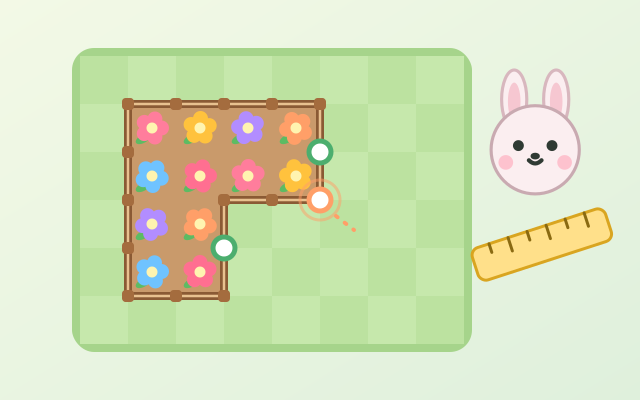
An area-and-perimeter game you can really get your hands on. A wooden fence surrounds a flower bed on a grid of grass. Drag a side or a corner to make the bed wider, longer or smaller, and the length of every side is labelled as you go. Animal clients ask for things like "an area of 12 squares", "exactly 16 fence pieces" or "area 18 and perimeter 18". Press "Check" and, if it is right, the bed bursts into flower.
There are 5 chapters and 30 levels. First you count squares to meet area (width × length), then count fence pieces to meet perimeter. From Chapter 3 only the side lengths are shown, so you work out area and perimeter yourself. Chapter 4 asks which shape gives the most area for the same fence, and which uses the least, or the most, fence for the same area. Chapter 5 joins two rectangles into an L or a T: overlapping squares count once, and the perimeter equals that of the rectangle that just fits around the shape. The last three chapters also have endless random challenges, generated and checked to always have an answer.
Getting it wrong is never a fail. A gentle note says what is off, such as "The area is 3 × 5 = 15 squares. It should be 12.", and you simply adjust and check again. If you are stuck, "Hint" explains the method and "Measure" shows the current area and perimeter.
How to play
- Press "Play", or pick a chapter and level from "Levels". The first time you enter a chapter, a "Design notes" card explains what it is about.
- Read the animal's request at the top, then drag a side (green dot) or a corner (orange dot) of the fence to resize the garden. The number beside each side tells you how many squares long it is. In Chapters 1 and 2 the area or perimeter sum is shown live below the grass.
- Press "Check" when you think it is right. If it is not, a note at the bottom of the grass says how far off it is; adjust and check again.
- From Chapter 3 you do the maths: area = width × length, perimeter = (width + length) × 2. If you are stuck, "Measure" shows the current numbers (that level then gives one star fewer).
- Chapter 5 has two beds. Drag the middle of a bed (or switch to "Move" and use the arrow buttons) to join them into an L or a T; they must touch along at least one whole square edge. "Switch" chooses which bed the buttons change.
- A right answer earns 1–3 stars: 3 with no wrong checks and no measuring, one fewer for each, down to 1. Clearing 4 levels of a chapter opens the next one.
Controls
- Phone / tablet: drag a side (green dot) or a corner (orange dot) of the fence to stretch or shrink the garden. In Chapter 5, drag the middle of a bed to move it. The wider, narrower, longer and shorter buttons change it one square at a time.
- Mouse: click and drag a side or corner of the fence, or the middle of a bed to move it; every button can be clicked.
- Keyboard: ← → change the width, ↑ ↓ change the length, Shift + arrows move a bed, Tab or X switches beds, V toggles size / move, Enter checks, H shows a hint or measures, R resets, M mutes, Esc goes back to the levels.
For parents
- Made for ages 9–12, and teens can enjoy Chapters 4–5 and the random challenges too. Area and perimeter are a core part of upper-primary maths, and children often mix them up. Here they stretch the same garden back and forth and see for themselves that the same area can have different perimeters and that squarer shapes hold more area. They move step by step from counting squares to multiplying and adding, and on to composite shapes.
- There is no timer and there are no lives. A wrong answer only explains what is off, and the child keeps adjusting; hints and "Measure" are always available. The game shows only gardens, fences and friendly animals, with no violence, scary content or gambling.
- No chat, in-app purchases, ads, outbound links or online leaderboards, and no personal details are ever asked for. Stars, seen chapter notes and the mute setting are stored only in this device's browser, and the game also works offline.