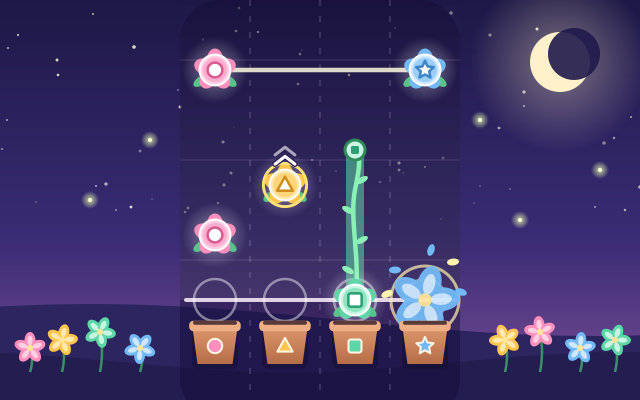
In a garden at night, buds fall down four lanes towards the flowerpots below. When the beat arrives, press that lane: tap for a plain bud, keep holding to the end for a bud on a vine, press and swipe up for a bud with a golden ring and an arrow, and use two fingers for two buds joined by a line. The better your timing, the bigger the flower that opens.
There are 6 original songs from 92 to 138 BPM, each with three difficulties: Sprout, Bloom and Full Bloom. "Random Song" also makes a brand-new tune and chart every time. All the music is synthesised live with WebAudio; there are no recordings at all.
Charts are built from each song's melody: when the tune goes up, the buds move to lanes further right; long notes become holds and phrase endings become flicks. So while you play, your fingers are really "playing" the song.
How to play
- Press "Play" to open the song list, choose a song and a difficulty (Sprout is slowest with the fewest notes; Full Bloom is fastest and has taps to make while holding), then press "Start". The first time, a short how-to card appears.
- The first two bars are a count-in, with four dots marking the beats. When a bud reaches the white line at the bottom, press its lane: tap, hold until the end of the vine, or press and swipe up.
- Each press is judged Perfect, Great, Good or Miss, and Great and Good also tell you whether you were early or late. A miss only resets your combo: the song always plays to the end.
- Tapping a flick bud without swiping counts as Good; letting go of a hold too early counts its end as a Miss.
- After the song you get a score, a grade from S to D and 1 to 3 flowers. If it feels too fast, switch on "Speed 75%" to practise (practice runs are not saved as records).
Controls
- Phone / tablet: each whole lane is a button, so press at any height. Tap, press and hold, or press and swipe up; when two buds are joined, use two fingers at once (multi-touch works).
- Mouse: click a lane; hold the button down for hold notes; drag upward a little for flicks.
- Keyboard: D F J K are the four lanes; to flick, hold the lane key and press Space or ↑; Esc or P pauses, M mutes. On the song list, arrow keys pick a song, 1–3 pick the difficulty, S toggles practice speed and Enter starts.
For parents
- Made mainly for ages 13 and up; 9–12-year-olds can start with Sprout at 75% speed. Rhythm games build a steady sense of beat, hand–eye coordination and two-handed control, and the hardest charts ask one hand to hold while the other taps.
- There are no lives and no failing out: a miss only resets the combo, and every song plays to the end. Scores and grades are only compared with your own records. There is no violence, nothing scary and no gambling, just flowers and music.
- All the music is original and synthesised live by the game; no audio files or copyrighted songs are used, and there is a mute button. Besides its colour, each lane has its own mark (circle, triangle, square, star), so players with colour-vision differences can tell them apart.
- No chat, in-app purchases, ads, outbound links or online leaderboards, and no personal details are ever asked for. Best scores and settings are stored only in this device's browser, and the game also works offline.