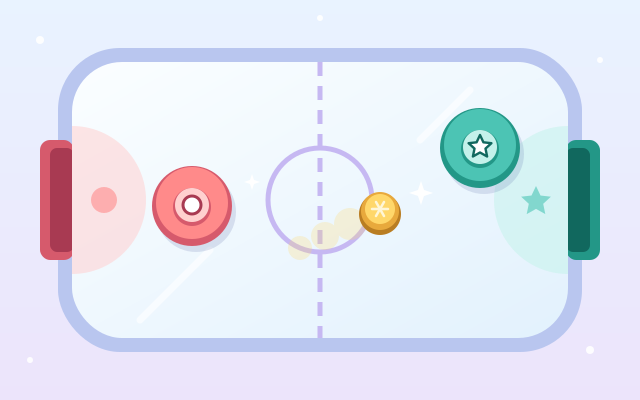
A frozen pond turns into an air-hockey table. Drag your paddle around your half of the ice and knock the sliding puck into the other goal. The faster your paddle moves, the faster the puck flies, and you can bank it off the side walls too.
In single-player mode you play the computer: Penguin (easy), Seal (normal) or Polar Bear (strong). It reads where the puck is heading to defend, and looks for angles and bank shots when it attacks.
Two-player mode is for two people on one phone or tablet, one at each end. Both fingers work at the same time, and the text on the far side turns around to face that player. Play first to 3, 5 or 7, and switch on two pucks for a livelier game.
The two sides are not told apart by colour alone: the Dots (●) and Stars (★) each have their mark on their paddle, goal and score, so colour-blind players can follow along too.
How to play
- On the menu, pick 1 Player or 2 Players, the opponent (single player), the score to win and the number of pucks, then tap Play.
- You can move your paddle during the 3-2-1 countdown. "Drag here" appears next to your paddle: press it, or anywhere on your half, and drag.
- Your paddle stays on your own half. Move into the puck to shoot, or stay in front of your goal to defend. Hitting the puck off-centre sends it away at an angle.
- Getting the puck into the other goal scores 1 point. The side that was scored on gets the puck back on their own half, ready to strike back.
- The first to reach the target wins. Tap Rematch to go again with the same settings, or Menu to change them. The pause button on the centre line stops the game at any time.
Controls
- Phone / tablet: press and drag anywhere on your own half and the paddle follows your finger. In two-player mode both players can drag at the same time.
- Mouse: in single-player mode the paddle simply follows the cursor; in two-player mode press and drag on your half.
- Keyboard: arrows or WASD in single-player mode; with two players, Dots use the arrows and Stars use WASD. Esc / P to pause, Enter to start or rematch, M to mute.
For parents
- Made mainly for ages 13 and up, and fine for 9–12. It is a real-time sports game that practises hand-eye coordination, reading rebound angles and choosing when to attack or defend. Two-player mode is great for family or friends sharing one tablet face to face.
- There are wins and losses, but a game lasts only a minute or two, a loss is met with gentle encouragement, and a rematch is one tap away. The easiest computer opponent is slow to move and react, so beginners can score. The theme is a friendly hockey game on a frozen pond, with no violence, scary content or gambling.
- The two sides are marked with dots and stars as well as colour. There is no chat, no in-app purchases, no ads, no outbound links and no online leaderboard, and no name or personal details are ever asked for. Settings, mute and the record against the computer are stored only in this device's browser. The game pauses itself when you switch tabs.