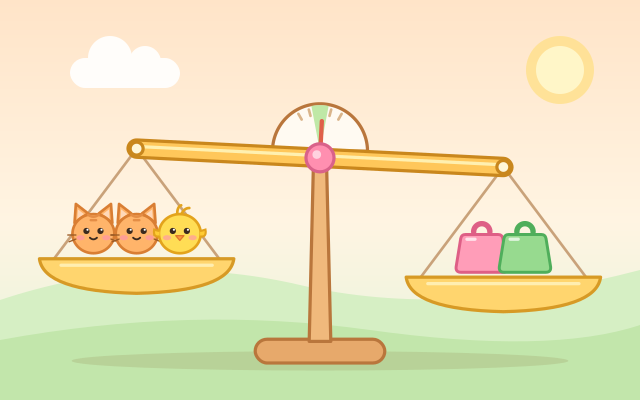
A balance-scale maths puzzle. The big scale has animals and weights on its left pan. Pick weights (and sometimes animals) from the tray, put them on the right pan and tap "Weigh!". If both sides weigh the same, the scale balances.
The animals' weights are never shown directly. You work them out from the little scales at the top, which are already balanced: if two frogs balance a 5 and a 1, one frog weighs 3. Later levels chain these swaps (find the frog, then use the frog to find the chick), and the Master Tower asks you to use two or three scales together, like simple simultaneous equations.
There are 5 areas and 30 levels: adding practice, one animal, swapping two animals, tricky trays with no 1s or with animals to place, and finally three-animal challenges. Every puzzle is generated by code and checked so that the little scales pin down each animal's weight exactly and the tray can always make the answer. After level 30, Random Scales offers Easy, Medium and Hard puzzles that are new every time.
How to play
- Tap "Play!", or choose a level from "Levels".
- Look at the little scales at the top first. They are all balanced, so use them to work out what each animal weighs.
- Tap things in the tray to put them on the big scale's right pan. Tap something on the pan to take it off, or use the button at the bottom left to clear it. The right pan shows its total weight (or "?" while it holds an animal whose weight is still unknown).
- When you think both sides weigh the same, tap "Weigh!". If they don't, the scale tips toward the heavier side and tells you whether to add or take off. Change it and weigh again.
- Stuck? Tap Hint. It first tells you each animal's weight and which little scale shows it, then the left side's total, and finally the next piece to put on or take off.
Controls
- Phone / tablet: tap a weight or animal in the tray to put it on the right pan; tap something on the right pan to take it off. When you are ready, tap "Weigh!".
- Mouse: click, just like tapping.
- Keyboard: number keys 1–4 put the matching tray piece on; Backspace or Z takes the last one off; Enter, Space or W weighs; C clears the right pan; H for a hint; Esc for the level list.
For parents
- Designed for ages 6–12. The first areas practise addition and the idea of "the same weight", which suits younger children. The later swaps and multi-scale puzzles are picture-based algebra (simple equations) for older kids, and they make grown-ups think too.
- No timers, no move limits and no failure screen. A wrong weighing only tips the scale and gently suggests adding or taking something off, so children can keep adjusting until it works. Hints are unlimited and cost nothing.
- No chat, in-app purchases, ads or outbound links, and nothing to type in. Progress and sound settings are stored only in this device's browser; music and sound effects can be turned off separately.