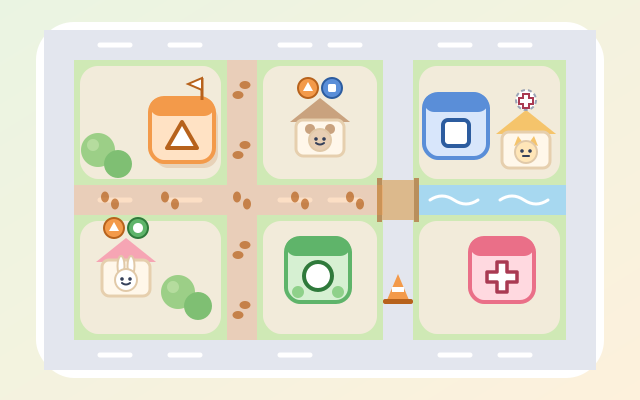
A town-planning puzzle game. Every level is a town made by the game: streets divide it into blocks, and the blocks hold animal homes, shops, trees and a few empty lots. Marks above each home show which public services the family needs within walking distance: school (triangle), park (circle), clinic (plus) and library (square).
Each service has its own walking distance: school 4 steps, park 3, clinic 6 and library 5. Walking along the streets from its door, the first square is step 1, and a home can walk there if the street in front of it is within that many steps. Distance follows the streets, not a straight line: streets turned into flower beds, a river you can only cross by bridge, and road works with traffic cones can make a place that looks close a long walk away. When you build a service, footprints spread along the streets step by step to show who can walk there.
You have only so many buildings and there are more lots than you need, so think about where each one helps the most homes. There are 5 chapters and 30 towns: schools only; parks too, with different distances; rivers and bridges; homes with different needs and road works; and all four services competing for lots. Random towns add endless play. Every town is checked by an exhaustive search to make sure it can be solved, and the game knows the fewest buildings needed.
How to play
- Tap "Start planning", or pick a chapter and town from "Levels". The first time you open a chapter, a card explains its new rule.
- Look at the marks above each home: a hollow, dashed mark means they cannot walk to that service yet, and a filled mark means they can. When every mark is filled, the animal smiles.
- Tap a service card below (it shows the walking steps and how many are left), then tap an empty lot on the map, or drag the card onto a lot. Footprints spread along the streets to show where that service reaches.
- Mistakes are easy to fix: tap a building to take it back, or use "Take all back" to start over. Tap a home to see how many steps each of its needs is, with step numbers drawn on the streets from that home, which helps you find the best lot.
- The town is done when every need of every home can be reached on foot. Using the fewest buildings earns 3 stars, one more earns 2, and more than that earns 1; using a hint gives 2 stars at most. The hint makes a lot glow or points out a building that should move. Clearing 4 towns in a chapter opens the next.
Controls
- Phone / tablet: tap a service card below, then tap an empty lot on the map to build it, or drag the card straight onto a lot. Tap a building to take it back; tap it while another service is chosen to swap it for that one. Tap a home to show how many steps it is from there along the streets.
- Mouse: click and drag just like tapping. With a service chosen, hovering over a lot outlines its walking range first.
- Keyboard: 1–4 pick a service, arrows move between lots and homes, Enter or Space build / take back (or show steps on a home), Delete take back, H hint, R take all back, M mute, Esc back to levels. On the level screen, ← → change chapter, 1–6 pick a town and P opens a random town.
For parents
- Made mainly for ages 9–12, and teens can take on the later chapters. The game turns a real town-planning question, where public services should go, into a reasoning puzzle: measure walking distance along a street network (not a straight line), compare how far different services reach, and make trade-offs when buildings and lots are limited, so every home is served with the fewest resources. It connects to paths and distance in maths and to communities and public services in social studies, and it is a nice way to ask together: "Can we walk to a school, a park or a clinic from our home?"
- There is no timer and there are no lives. Running out of buildings only brings a gentle note to take one back and try another lot, and one button takes everything back to start again. Hints are unlimited and only cap the stars at 2. Every town is made up and full of friendly animals, with no real place names, violence, scary content or gambling. Besides colour, each service always has its own shape (triangle, circle, plus, square), so children who see colours differently can play too.
- No chat, in-app purchases, ads, outbound links or online leaderboards, and no personal details are ever asked for. Stars, seen chapter cards and the mute setting are stored only in this device's browser, and the game also works offline.