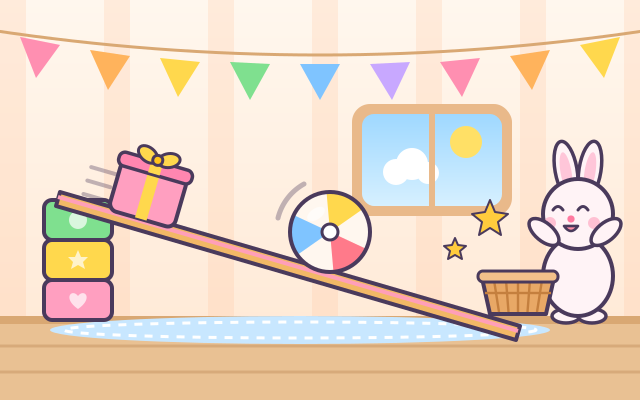
In a playroom there is a wooden ramp. Its high end rests on a stack of colourful blocks, and at the low end Bunny, Bear, Piggy, Duckling or Kitty waits with a basket. Tap the green + to stack another block and the ramp gets steeper; tap the pink − to take one away and it gets flatter. A toy at the top follows a simple incline model (the downhill pull against friction): the round ball, orange and wheel roll down even on a gentle slope, spinning as they go; the flat book needs 3 blocks and the gift box and wood block need 4 before they slide down, without spinning; the ice cube is so slippery that 1 block is enough. The steeper the ramp, the faster things go.
Each round has 5 little jobs, and the job types and toys change every time. "Send it down": stack blocks one at a time until the toy starts moving. "Which one rolls?": the ramp stays gentle, and you tap one of 3 toys to try it; flat ones stop, wiggle and hop back to the shelf, the round one rolls into the friend's basket. "Lay it down": a juice can or drum standing on its flat end will not move, so tap it to lay it on its round side and down it rolls. Finishing a round earns a toy sticker, with 9 toys to collect.
In "Free play" you can pick any of the 9 toys and stack 0 to 5 blocks to see who rolls, who slides and who stays put on the same slope. Tap the can or drum to stand it up or lay it down.
How to play
- Tap "Play!". The speech box at the top says what the job is (tap it to hear it again), and the 5 stars show how far along the round you are.
- "Send it down": tap the green + to stack blocks and make the ramp steeper. If the toy has not moved yet, stack one more. Round things roll with 1 block; flat things need a few more before they slide. Too many is fine, and − takes one away.
- "Which one rolls?": tap one of the 3 toys below and it hops onto the ramp to try. A toy that stays put goes back to the shelf with a small "stays" tag, so just try another.
- "Lay it down": tap the standing can or drum on the ramp (anywhere on the picture or its button below works), and once it lies down it rolls.
- A job is done when the toy lands in the friend's basket, and 5 jobs earn a toy sticker. If nothing happens for a while, the button to press starts to glow.
Controls
- Phone / tablet: everything is a single tap. The green + button stacks a block (steeper ramp), the pink − button takes one away (flatter ramp). Tap a toy on the shelf and it hops onto the ramp. Tap a standing can or drum on the ramp (or its shelf button) to lay it down.
- The buttons are big (at least 64 px). No dragging and no timing needed.
- Tap the speech box at the top to hear the instructions again (on devices that have a voice).
- Keyboard: ↑ or + stacks a block, ↓ or − removes one; number keys 1–9 pick a toy from the shelf; Space or Enter lays the can down; Esc returns to the title.
For parents
- Made for ages 3–5. By changing the ramp's height themselves, children see that round things roll and flat things slide, that a steeper slope makes things start moving and go faster, that slippery things slide on a gentle slope while rough ones need it steeper, and that the same can stays put standing up but rolls when it lies down. These cause-and-effect ideas are groundwork for later learning about friction, gravity and simple machines. Whether a toy moves, and how fast, comes from a simple incline model, not a pre-made animation. Try asking "Why is a slide slanted?" or "What at home can roll?", or build a ramp together from a book and some blocks.
- There is no losing, no score and no timer. A toy that cannot move just wiggles, a toy that does not roll hops back to the shelf to try again, and the button to press glows only after a while without progress. Every action is a single tap on a big button (at least 64 px), with no dragging. Instructions come with icons and can be read aloud by the device's voice with a tap. There is no chat, no in-app purchases, no ads and no outbound links, and no name or personal information is ever asked for.
- Only the toy stickers, the number of rounds played and the sound setting are remembered, in this device's browser (the game still works if saving is blocked). The speaker button switches off both sounds and read-aloud, and the game also works offline.