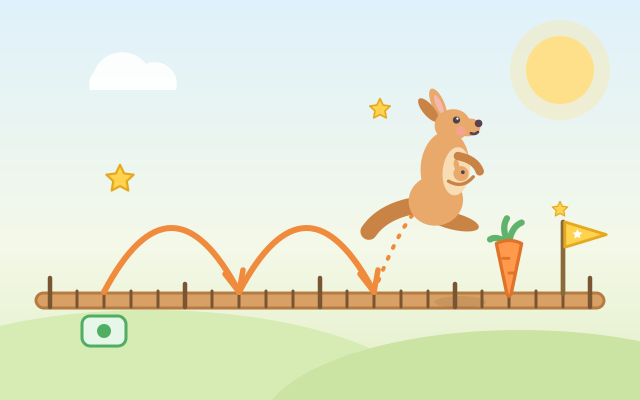
A game for learning addition and subtraction on a number line. The kangaroo stands on a number line that looks like a wooden boardwalk. Each tap of a hop button makes it hop forward or back, leaving an arc labelled "+10" or "−1" on the line, and the "Hopped" strip below keeps a record of every hop.
Five chapters of six tasks each build up from counting on to two-digit mental strategies: (1) Hop Forward: a 0–20 line, hop to the carrot with +1 and +5, or work out sums like 8 + 5; (2) Hop Back: hop left with −1 and −5, because hopping back is taking away; (3) Tens at a Time: a 0–100 line with only the tens labelled, where +10 and +1 split 23 + 34 into "three tens and four ones"; (4) Smart Hops: to add 19, hop +20 and back 1, using fewer hops; (5) How Far Apart?: hop from one flag to the other and add up the hops to get the difference, plus missing-number tasks like "38 + ? = 63".
After hopping a sum, the line zooms in on the stretch where the kangaroo landed, and children count on from the ten to read the number, then pick it from three number cards. Random practice mixes all five chapters. The numbers are generated every time, so there is always more to play. Forward and backward hops differ in color and also in sign, solid or dashed lines and arrow direction, so color is never needed.
How to play
- Press Play!, or open Chapters and pick one: Hop Forward, Hop Back, Tens at a Time, Smart Hops, How Far Apart?. Random practice is there too.
- Read the speech bubble: "Hop to the carrot at 17" means the kangaroo should land right on the carrot; "34 + 25 = ?" means hop 25 forward from 34; "34 → 75" means hop from the green square flag to the yellow triangle flag and see how far you hopped.
- Tap the hop buttons: + hops right and − hops left, by 1, 5 or 10. Every hop is drawn on the line and written in the "Hopped" strip; repeated hops are grouped, like "+10 ×3".
- Hopping too far is fine: hop back, or press Undo in the middle. When you have hopped the right total in a sum, the line zooms in. See which two tens the kangaroo is between, then pick the answer from three number cards. For "how far" tasks, add up all the hops.
- There is no timer and no way to fail. A wrong card turns grey and the game says what might have gone wrong, so just pick again. Finishing with the fewest hops earns a smart-hop star; if you used more, that is fine too, and the game shows a quicker way. The light-bulb Hint lights up the button to press next, or puts small numbers on the line, as often as you need.
Controls
- Phone / tablet: tap a hop button and the kangaroo hops forward (+1, +5, +10: orange, solid arrow) or back (−1, −5, −10: blue, dashed arrow). The white button in the middle is Undo. Once the kangaroo arrives, tap one of the three number cards to answer.
- The light bulb at the top is a hint that lights up the button to press next; press Next when the task is done.
- Mouse: click any button or number card.
- Keyboard: → ← hop +1 / −1, ↑ ↓ hop +5 / −5 (+10 / −10 in later chapters), Backspace or Z to undo, 1–3 pick a number card, Enter for Next, H for a hint, M for sound on/off, Esc for the menu.
For parents
- Designed for ages 6–8, it covers addition and subtraction within 20 and within 100 from the early school years, and the move from counting in ones to mental strategies. The number line shows adding as moving right, taking away as moving left and difference as the distance between two points; many curricula use it to bridge hands-on counting and mental maths.
- Each chapter targets one strategy: using 5 as a landmark; splitting two-digit numbers into tens and ones (23 + 34 → +10 +10 +10 +1 +1 +1 +1); compensation (+19 → +20 −1); and counting up to find a difference or a missing number, which shows that addition and subtraction undo each other. The game uses a shortest-path search to work out the fewest hops for every task. Children who match it earn a star, and otherwise the game shows a shorter route, so they discover the strategies themselves instead of memorising answers.
- The answer to a sum has to be read off a line that only labels the tens, which practises counting on from the nearest ten. Wrong answers get a hint that matches the mistake, such as being 10 out, 1 out, or giving the end number when the question asks how far. No timer and no failure: children can undo hops and use hints as often as they like. No chat, in-app purchases, ads or outbound links, and nothing to type in. Finished chapters, stars and the sound setting are stored only in this device's browser; sound can be turned off.