A game about how to measure length. Bear runs a woodworking shop, and animal customers bring pencils, carrots, caterpillars, ribbons and loaves of bread to ask "How long is this?", or order boards for bookshelves, little bridges and door signs.
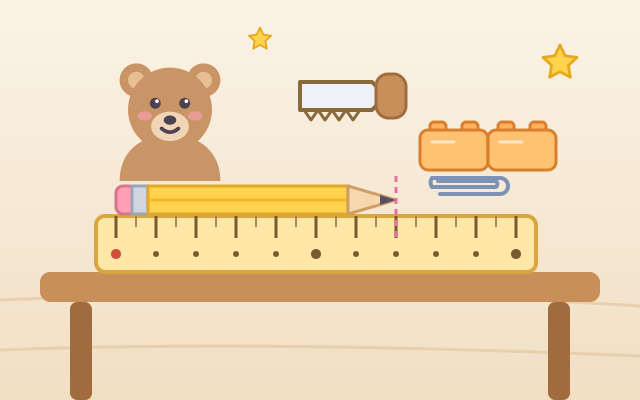
Five chapters of five customers each go from the very first ideas to using a ruler: (1) End to End: line up identical blocks under the thing, with no gaps and no overlaps, starting at the left end, then count them; (2) A Different Unit: the thing was already measured in blocks or craft sticks, so how many shorter paper clips is it? Smaller units give bigger numbers; (3) Ruler Zero: drag the ruler so its 0 is at the left end, then read the number at the right end; (4) Broken Ruler: the ruler does not start at 0, so count the spaces or subtract the two numbers; (5) Saw to Size: drag the saw to the length the customer wants, and the cut piece shows how long it really is; for the last customers you line up the ruler yourself first.
Random orders mixes all five kinds. Things, lengths and customers are generated every time, so there is always more to measure. Blocks, paper clips and craft sticks all have different outlines, and the ruler has big marks and numbers, so color is never needed.
How to play
- Press Play!, or open Chapters and pick one: End to End, A Different Unit, Ruler Zero, Broken Ruler, Saw to Size. Random orders is there too.
- Read the customer's speech bubble: what to measure and with what, or how many cm the board should be. The line below tells you what to do for this order.
- Measuring with blocks: tap the box and blocks line up one after another from the left end. If you drag one yourself it must touch end to end; a gap or an overlap slides back into place with a short explanation. Once they reach the line at the right end, count them, choose the number with − and +, and press Done!.
- Measuring with a ruler: hold the ruler and drag it so the red 0 is at the left end of the thing, then see which number the pink dashed line at the right end touches. On a broken ruler, tap the ruler to count the spaces one by one with green numbers, or subtract the two end numbers.
- Sawing a board: make sure the ruler's 0 is at the left end of the board, drag the saw to the number the customer asked for, and press Saw!. The piece shows its length; if it is not right, the game says whether it is too long or too short and hands you a fresh board.
- There is no timer and no way to fail. A wrong answer just gets a hint about why, and you can try again as often as you like; a customer answered right on the first try gives you a star. The light-bulb Hint marks where the next unit goes, where the ruler should go or where to saw, as often as you need.
Controls
- Phone / tablet: tap the box of blocks or paper clips and one is added end to end under the thing. You can also drag one up and place it yourself; if it lands crooked, it slides to the right spot. Hold the ruler or the saw and drag it left or right; it snaps to the nearest mark when you let go.
- Choose your answer with − and + below (hold to keep counting), then press Done!; in the sawing chapter press Saw! instead. The light bulb is a hint. When the customer has their order, press Next.
- Mouse: click any box or button, and hold and drag the ruler or saw.
- Keyboard: number keys type the answer, ↑ ↓ or + − change it, ← → move the ruler (in the sawing chapter they move the saw, and Shift + ← → moves the ruler), Space adds a unit / counts a space / saws, Enter answers (Next once done), H for a hint, M for sound on/off, Esc for the menu.
For parents
- Designed for ages 6–8, it covers the core ideas of measuring length from the early school years. Measuring means counting how many times a unit fits, so children first use non-standard units such as blocks and paper clips and practise laying them end to end, with no gaps or overlaps, starting at the end of the object (unit iteration). Then they measure the same thing with a different unit and see that a smaller unit gives a bigger number, which is why we agree on a shared unit (the centimetre).
- The ruler chapters target children's most common mistakes: not lining up the 0, treating the edge of the ruler as 0, and reading the number at the right end instead of the length. The broken ruler asks children to count spaces rather than lines, or to subtract the two readings, which is the key to understanding that a number on a ruler means "how far from 0". The last chapter turns it around: make something to a given length. In its later orders the ruler starts out of line on purpose and must be lined up first. Wrong answers get a hint that matches the kind of mistake (for example "That is the number at the right end, but the 0 is not at the left end"), not just "wrong".
- All lengths are whole centimetres, and the ruler and saw snap to the marks so small hands can be precise. No timer and no failure: wrong answers can be retried without limit, hints are unlimited, and a first-try answer earns a bonus star. No chat, in-app purchases, ads or outbound links, and nothing to type in. Finished chapters, stars and the sound setting are stored only in this device's browser; sound can be turned off.