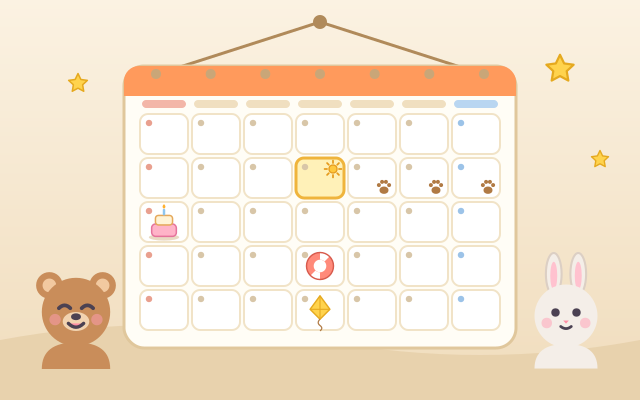
A game for reading a calendar and working out dates. Animal friends such as a bear, a rabbit and a fox come to make plans: a birthday party, a picnic, swimming class, library day, tree-planting day, kite day, a drum show and cookie day. Each task is one sentence, like "Today is the 9th. In 4 days we go on a picnic. Which date is that?" Children find the answer on a calendar hanging on the wall and stick the plan sticker on it, or say what day of the week it is, or how many more sleeps there are.
Five chapters of six tasks each go from the cycle of the week to counting across months: (1) Seven Days: the seven weekdays sit in a circle; count tomorrow, yesterday and a few days later, and notice that Sunday comes again after Saturday and that 7 days later is the same weekday; (2) Read the Calendar: "What day is the 18th?", "the second Saturday", "the last Friday", "How many Sundays are in this month?"; (3) Days Later, Days Ago: count on or back from "Today" (marked with a sun), and count the sleeps; (4) Week by Week: one week later is one square down in the same column, and 10 days later is 7 days plus 3; (5) Long and Short Months: how many days a month has, turning to next month to keep counting, what day the 1st of next month is, and counting down across a month.
The calendars follow real years (2025 to 2031, including leap-year Februaries), and the month, dates and plans are generated every time. Random practice mixes all chapters, so there is always more to play. "Today" is yellow and also has a sun and a "Today" tag, and every plan sticker has its own picture, so color is never needed.
How to play
- Press Play!, or open Chapters and pick one: Seven Days, Read the Calendar, Days Later, Days Ago, Week by Week, Long and Short Months. Random practice is there too.
- Read the speech bubble: an animal friend tells you a plan, with the plan sticker beside it. If it asks "which date", tap that date on the calendar (or drag the sticker there); if it asks "what day", tap the weekday at the top or any square in its column; if it asks "how many", pick a number card below.
- When a task has a "Today", start from the day with the sun. Today does not count; the next day is 1. When the count goes into next month, press › above the calendar to turn the page and keep counting.
- There is no timer and no way to fail. A sticker on the wrong day bounces off, and the game says what might have gone wrong, such as counting today too, being one week off, or looking in the wrong column. After two tries, or two presses of the light bulb, little footprints hop day by day to the answer and count out loud with you.
- Tasks answered right the first time without the footprints earn a star. At the end of a chapter, a card shows where every plan went.
Controls
- Phone / tablet: when the answer is a date, tap that day on the calendar and the plan sticker flies over and sticks; you can also hold the sticker and drag it onto the date. When the question asks for a weekday, tap the weekday row at the top or any square in that column (in chapter 1, tap a day on the circle). When it asks "how many days" or "how many sleeps", tap one of the three number cards.
- The ‹ › buttons above the calendar turn to the month before or after (only tasks that cross a month need them). The light bulb at the top is a hint: the first press lights up "Today", the column or the day to look at, and the second press sends little footprints hopping day by day to count with you. Press Next when the task is done.
- Mouse: click any button, date or number card, and drag the sticker if you like.
- Keyboard: arrow keys move the frame on the calendar (or the circle), Enter or Space sticks / picks, PageUp / PageDown or [ ] turn the page, 1–3 pick a number card, Enter for Next, H for a hint, M for sound on/off, Esc for the menu.
For parents
- Designed for ages 6–8, it covers the early-school topic of calendars, weekdays and dates: the seven-day cycle, finding dates and weekdays on a calendar, days later and days ago, a week as 7 days, and months of 31, 30 and 28 or 29 days. Children meet questions like "how many days until the holidays?" or "what do I bring next Wednesday?" every day; this game turns them into short tasks they can practise again and again.
- The calendars follow real years, so children see the same layout as a real wall calendar. The tasks are built around common mistakes, and hints match the mistake: counting today as one of the "days later" (one day off), being in the right column but a week off, looking in the wrong weekday column, or counting today as a sleep. Chapter 4 lets children discover that one square down is 7 days later and use 7 + 3 for 10 days later; chapter 5 practises turning to next month and counting on, linked to long and short months and the knuckle trick.
- No timer and no failure, and hints are unlimited: first "Today" or the right column lights up, then footprints count day by day. The plans are activities found everywhere, such as birthday parties, picnics and library days, rather than one country’s holidays. No chat, in-app purchases, ads or outbound links, and nothing to type in. Finished chapters, stars and the sound setting are stored only in this device’s browser; sound can be turned off.