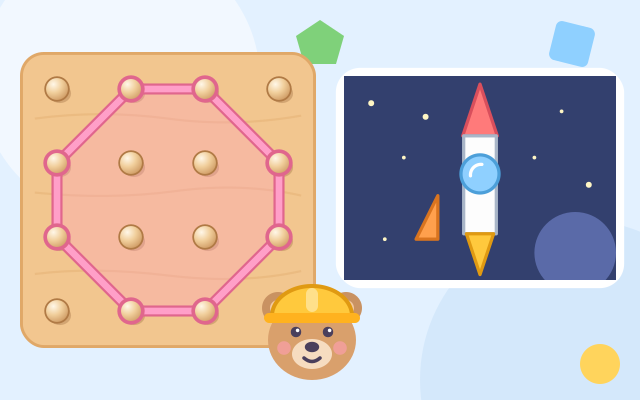
A 4×4 wooden peg board (a geoboard) and one rubber band. The band starts as a loose circle with no corners. Tap a peg and the band hooks onto it and pulls tight around every hooked peg, so each hooked peg is a corner. Tap a hooked peg to take it off; take them all off and the band springs back into a circle.
Builder Bear wants to make a picture: a house, an ice cream, a sailboat, a robot, a rocket, a fish, a castle and a birdhouse. Each part is not shown as an outline; it is described by its features: 3 corners, 4 corners, 4 sides all the same length with 4 square corners (a square), 4 square corners with long and short sides (a rectangle), 5 corners, 6 corners, or round with no corners. Any shape with those features is right, so a tall thin triangle or a tilted square is fine.
While building, the dots next to the speech box fill in one by one to show how many corners there are; square corners get an L-shaped mark on the board, and sides of the same length get the same tick marks. When it fits, the corners light up and count 1, 2, 3…, Bear says the name of the shape, and the child's own shape (just as tall or wide as they made it) flies into the picture. Finished pictures go into a picture book together with the shapes the child made.
The first 8 pictures come in order and slowly get harder: at first only 3 corners, 4 corners and circles, then squares and rectangles, and finally pentagons and hexagons. After that the pictures are chosen at random and each part's request is mixed up again. "Free play" names any shape you make and counts its corners, all the way up to an octagon.
How to play
- Tap "Play!". The small picture at the top is what you are making today, and the pink dashed frame is the part to make now. Bear's speech box says which shape to make (tap it to hear it again), and the dots beside it show how many corners.
- Tap pegs to hook the band on; it takes at least 3 pegs to make a shape with corners. To change the shape, tap a hooked peg to take it off. If you tap a peg that is already inside the band, Bear reminds you to tap one outside.
- For a circle, the band starts caught on a few pegs. Tap them all off (or press "Take it all off") and when the band springs back into a circle, it is done.
- When it is not right yet, Bear says what is missing: too many corners, too few, corners that are not square, or sides that are not the same length. If you are stuck, press "Hint" and tap the glowing pegs and take off the pegs marked ✕.
- Each finished part flies into the picture. When every part is done you get the picture and can choose "Next picture", the picture book or the title. "Free play" on the title screen lets you make any shape and change the band's color.
Controls
- Phone / tablet: tap a peg to hook the rubber band on it, and tap a hooked peg to take it off. Each square of the board belongs to its peg (at least 64 px), so taps do not have to be exact, and there is no dragging or timing.
- Two big buttons at the bottom: "Hint" makes the pegs to tap glow and marks the pegs to take off with ✕; "Take it all off" lets the band spring back into a circle. In free play the hint button becomes "New color". Tap the speech box to hear it again (on devices that have a voice).
- Keyboard: arrow keys move the blue frame on the board, Enter or Space hooks or unhooks; H hint; R, Backspace or Delete takes it all off; C changes color in free play; Esc goes back to the title or closes the picture book.
For parents
- Made for ages 3–5 (and fine for 6–8), this is early geometry about the features of shapes rather than memorising outlines. Young children often only accept a triangle in its "usual" pose and say a tall thin or upside-down one is not a triangle. Here they find out that anything with 3 corners is a triangle, a tilted square is still a square, a square shares the 4 square corners of a rectangle, and a circle has no corners at all. The corner dots, square-corner marks and equal-side ticks draw the invisible features where children can see them.
- Try asking while you play: "How many corners does this shape have? Let's count." or "Why isn't this a square? Which side is longer?" Look around the house too: how many corners does the door have? Does a plate have any? A rubber band stretched over fingers or chopsticks makes triangles and four-sided shapes as well.
- There is no losing, no score and no timer. A shape that does not fit yet only gets a note about what is missing, and the hint button is always there and always points to pegs that work. The only actions are tapping pegs and big buttons (at least 64 px); no dragging or timing. The speech box is read aloud by the device's voice. There is no chat, no in-app purchases, no ads and no outbound links, and no name or personal information is ever asked for.
- Only the number of finished pictures, the pictures in the picture book and the sound setting are remembered, in this device's browser; the game still works if saving is blocked. The speaker button switches off both sounds and read-aloud, and the game also works offline.