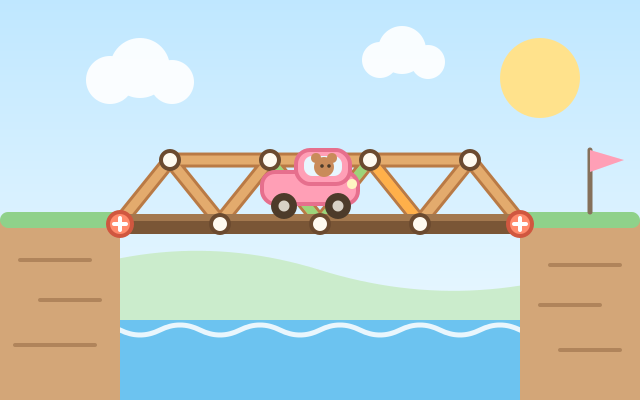
A physics building game. Each canyon has fixed red bolts on both banks. Place road and support beams between grid points to build a bridge, then tap "Test drive!". The bridge really sags under gravity, and as the car drives over, every beam glows from green to yellow to red with the strain it carries. Overloaded beams snap.
There are 18 levels in 3 areas. The Creek has only road and wood, and teaches how triangles make a bridge strong. Big Canyon adds steel (stronger but pricier), rock pillars in the river, and heavier vans and trucks. In the Wide River, tall posts let you hang the road with rope, which can pull but never push.
Every level has a material budget, and using less earns more stars (up to three). There is no single right answer: the same gap can take a truss bridge, an arch underneath or a hanging bridge.
How to play
- Pick a material (road, wood, steel or rope) and drag from a red bolt or a white joint you already built to a nearby grid point to place a beam. While dragging, the points you can reach light up and the cost is shown.
- Cars can only drive on road, so you need a road from the left bank all the way to the right bank. Road on its own sags, so add wooden triangles above or below it to make it strong.
- Tap "Test drive!" and watch. The redder a beam, the harder it is working. If something snaps and the car falls in, the driver grabs a float. Tap "Back to building" to return to your design; the beams that snapped glow red so you know where to add support.
- Stuck? "Hint" shows one design that is sure to work as a faint dashed outline. Copy it, or find a cheaper design for three stars. "Undo" steps back and "Clear" starts over.
Controls
- Phone / tablet: press on a joint (a red bolt or a white dot) and drag to another grid point to place a beam. You can also tap a joint and then tap where the beam should go. Tap the middle of a beam to remove it.
- Mouse: build the same way by dragging or clicking twice; click the middle of a beam to remove it.
- Keyboard: arrow keys move the cursor, Enter / Space select or place, Delete removes the last beam at the cursor, 1–4 pick a material, T starts or stops the test drive, Z undoes, H shows the hint, Esc deselects.
- On narrow portrait screens, tap "Zoom in" and drag an empty spot to move around.
For parents
- Made for ages 9–12. It lets kids experience real engineering ideas: triangles are rigid, beams are pulled (tension) or pushed (compression), and trusses, arches and hanging bridges carry loads differently. The colour of each beam during the test shows how forces travel through the bridge, so children can work out for themselves where it needs support.
- Failing is possible but gentle: a collapse just drops the car into the river, where the driver grabs a float. There is no timer and no penalty, and one tap returns to the design to keep improving it. Every level has a hint that is guaranteed to work, and stars depend only on how much material is used, which rewards trying again.
- No chat, in-app purchases, ads, outbound links or online leaderboards, and no personal details are ever asked for. Stars, the last design for each level and the sound setting are stored only in this device's browser.