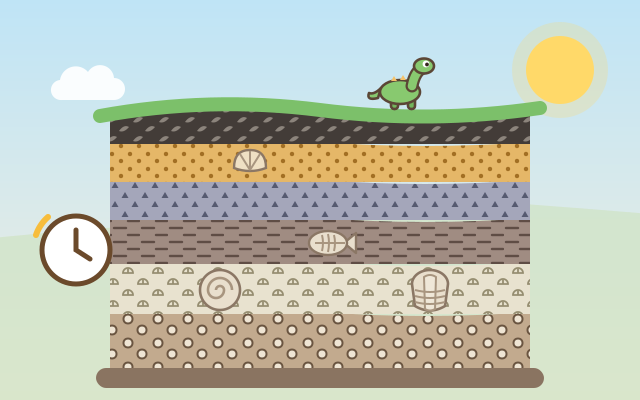
An earth science game about rock layers and fossils. The museum hands you a photo of a cliff, and every layer in it was left long, long ago: sand carried by a river, mud settling in a lake, pebbles washed in by a flood, shells piling up in the sea, ash drifting from a far-off volcano, and plants falling in a swamp. In the empty valley beside the photo, children "replay time" and build the same cliff layer by layer, starting from the bottom, which is the oldest.
Where the photo shows a fossil, they first bring a trilobite, an ammonite, a fish, a little dinosaur, a giant dragonfly or another creature or plant onto the ground of that time, then let the next sediment cover it so its shape stays in the stone. When all the layers are in, "Squeeze into rock!" fast-forwards time: sand becomes sandstone, mud becomes shale, pebbles become conglomerate, shells become limestone, ash becomes tuff and plants become coal. Every fossil and rock found goes into the book (12 fossils, 6 rocks).
There are 4 chapters and 24 levels: Start at the Bottom, Fossils Inside, Fossil Clues (some layers in the photo are hidden by vines, so the fossil tells you whether it was the sea, a lake, a river or a swamp), and Tall Cliffs with 5–6 layers. There are also endless random cliffs and a Free Build mode with no target at all.
How to play
- Tap "Play" to pick up at the first unfinished level, or choose a chapter and level from "Levels". On the left is the cliff photo: newer layers are at the top and older ones at the bottom. A yellow frame and a small arrow show which layer to build next.
- Look at the pattern of that layer in the photo and tap the sediment card with the same pattern (dots = sand, dashes = mud, rings = pebbles, little shells = shells, triangles = ash, leaves = plants). It falls from the sky and settles into the valley on the right as a new layer, and the finished layer in the photo gets a tick.
- If that layer has a fossil, first tap the critter card in the top row so it stands on the ground, then tap the layer's sediment to cover it. For layers hidden by vines and marked "?", think about the fossil inside: trilobites, ammonites, sea urchins and starfish lived in the sea (shells); fish, turtles and dinosaur tracks were by a lake (mud); clams and snails lived in a river (sand); ferns, giant dragonflies and ginkgo leaves were in a swamp (plants).
- A wrong tap does no harm: the sediment just floats back and the layer in the photo lights up. After two different tries in a row, the right card glows. The light bulb button gives a hint any time.
- When every layer is in, tap "Squeeze into rock!" to watch the sediments turn into rock and the fossils go into the book, then move on. In Free Build you can stack up to 8 layers however you like; a critter only becomes a fossil when the sediment from its own home covers it, otherwise it wanders off.
Controls
- Phone / tablet: tap a sediment card at the bottom (sand, mud, pebbles, shells, ash, plants) to let it settle into the valley as a new layer. If that layer in the photo has a fossil, tap the critter card in the top row first, then cover it. When every layer is built, tap "Squeeze into rock!".
- Mouse: click, just like touch.
- Keyboard: 1–6 pick a sediment, Q W E pick a critter, Enter squeeze into rock or go to the next level, H hint, M mute, Esc back; in Free Build, R shows other critters.
For parents
- Designed mainly for ages 6 to 8, and also a good review of the "rock layers and fossils" topic in school science for ages 9 to 12. The heart of the game is the law of superposition: in undisturbed rock, lower layers formed earlier and upper layers later, so children must start from the bottom of the photo to rebuild a cliff. Other ideas include how fossils form (living things quickly buried by sediment), how fossils reveal ancient environments (shells and trilobites mean the place was once sea), how sediments are pressed into sedimentary rock over a long time, and how plant remains become coal.
- To keep it clear for young children, the game simplifies things: each layer stands for one environment, rock formation is shown as "squeeze and wait a long time", and cementation, tilted layers and faults are left out. The volcano only puffs a small ash cloud far away, with no disasters, injuries or scary scenes, and creatures simply "leave their shape" when covered; death is never shown.
- There is no failing, no time limit and no score. A wrong tap only makes the sediment float back and shows which layer to look at, and after two wrong tries the right card glows. Every sediment has its own fixed pattern and icon, so colour vision is never needed. There is no chat, no in-app purchases, no ads, no outbound links and no leaderboard, and no personal information is ever asked for. Finished levels, the book and the mute setting stay in this device's browser only, and the game works offline once loaded.