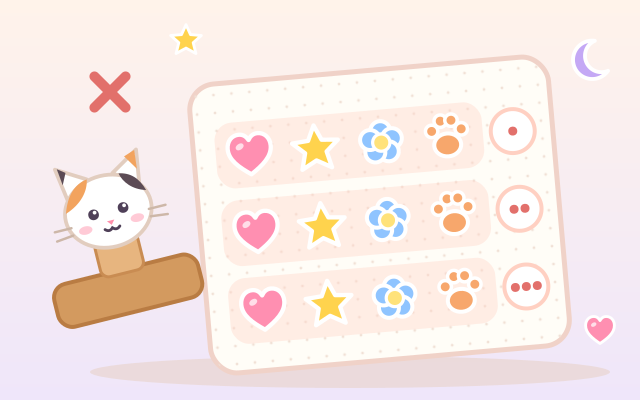
A game about what multiplication means. The calico cat has a magic stamp with one row of stickers on it, and every press of Stamp! prints another identical row on the sheet. The stamp really is magic: once a few rows are printed, adding one sticker to the stamp adds one to every row at the same moment, so children see that "one more in a row" means "as many more as there are rows". The end of each row lights up with skip-counting numbers like 4, 8, 12, and a finished sheet shows "4 × 3 = 12" with "4 in a row × 3 rows".
There are five chapters of five animal customers each. Make the sheet the order shows ("4 in a row, 3 rows"). Skip count a sheet the cat has stamped and pick how many there are. Find two different ways to make exactly 12; the Turn button spins the sheet a quarter turn to show that 4 × 3 and 3 × 4 are the same amount. Know the total and the row length and find how many rows to stamp (or, with the rows fixed, how many go in each row, an early feel for sharing equally). In the last chapter the stamp mixes hearts, stars and flowers: an order for "6 hearts and 3 stars in 3 rows" means building a "2 hearts, 1 star" pattern. Random practice mixes all five kinds of orders.
Every layout you finish goes into the Shape Book, which shows which rectangles each number from 4 to 36 can make, ready to be collected. Orders are generated, so every round is different. Stickers differ in shape as well as color (heart, star, flower, paw, moon), so color is never needed to tell them apart.
How to play
- Press Play!, or open Chapters and pick one: Rows of stickers, Skip counting, Just this many, How many rows?, Pattern stamps. Random practice is there too.
- Read the customer's speech bubble: it shows the order with a small picture or sticker counts.
- Use + and − beside the stamp to set how many stickers go in a row, press Stamp! to print a row, and the curved arrow to take the last row back. When the stamp changes, every row on the sheet changes with it. "In all" at the lower right is how many stickers are on the sheet, and the number at the end of each row is the skip count up to that row.
- When it looks right, press Done!. If something is off, the customer gently says what (for example "A row needs 4. Now it has 3" or "Now 10. 2 more to go"), so fix it and try again. There is no timer and no way to fail.
- Skip counting: press Count a row to light up the numbers one row at a time. The last row's number is the answer; tap it below. Pick a wrong one and the cat counts along with you once.
- Just this many asks for two different ways: change how many go in a row, or press Turn. In Pattern stamps, check how many of each sticker and how many rows the order wants, then tap stickers below to build the pattern. Stuck? Press the light-bulb Hint and a dashed outline appears; hints are unlimited and also show up by themselves after two tries.
Controls
- Phone / tablet: tap − and + beside the stamp for one sticker less or more, tap Stamp! (or the stamp itself) to print a row on the sheet, and the curved arrow to undo a row. In chapter 5, tap the heart, star or flower below to add that sticker to the stamp. When it looks right, press the green Done!.
- Skip-counting chapter: press Count a row (or tap a row on the sheet) to light up the numbers row by row, then tap the answer. In Just this many, the blue Turn button at the lower left of the sheet turns the whole sheet a quarter turn.
- Mouse: click any button.
- Keyboard: → one more on the stamp, ← one less, ↓ stamp a row, ↑ undo a row, 1–3 add a heart / star / flower in chapter 5, T to turn, Enter for Done / Count a row / Next, H for a hint, Esc for the menu.
For parents
- Designed for ages 6–8 and good review for 9–12. It builds the meaning of multiplication (equal groups and arrays, "in a row × rows"), skip counting by 2s to 6s, the commutative property (a quarter turn keeps the amount), the different factor pairs of one number (the Shape Book), and the idea behind division: working back from a total to the number of rows or the row length. The pattern-stamp chapter shows that "what is in one row × the number of rows" gives the total of each sticker, an intuitive first step toward the distributive property. Equations are written as "in a row × rows", with the words shown beside them, and the rules are the same in all three languages.
- Unlike counting games where each item is counted one by one, the focus here is copying one group many times: children change the stamp (one group) and the total on the sheet multiplies with it, so they feel the structure of multiplication instead of counting by ones. Numbers go up to 6 × 6, orders are generated, and difficulty rises gently within each chapter.
- No timer and no failure: a wrong sheet just gets a gentle note about what is different, and after two tries a dashed outline appears. Hints are unlimited. No chat, in-app purchases, ads or outbound links, and nothing to type in. Finished chapters, the Shape Book collection and the sound setting are stored only in this device's browser; sound can be turned off.