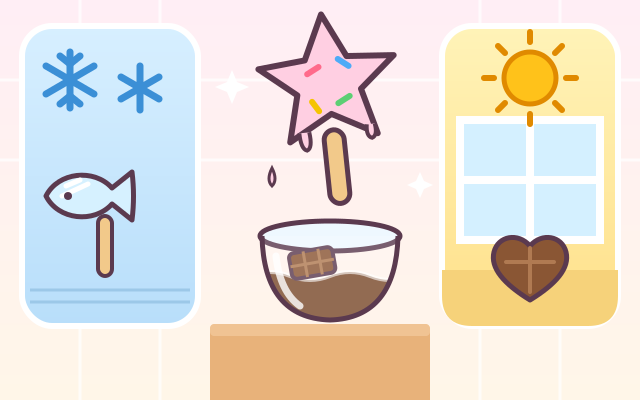
Animal customers come to the treat shop, and their speech bubble shows what they want: a star chocolate, a heart jelly, a fish ice cube, a bear ice cream bar… The kitchen has four places. The freezer is the coldest, the fridge is a little cold, the table is in between and the sunny window is the warmest. Children move the bowl somewhere warm and watch the hard pieces shrink and turn runny. Once it has all melted, a tap pours it into the mold. Then they move the mold somewhere cold, wait for it to harden and pop the treat out for the customer.
The same thing can melt and harden again and again: that is melting and freezing (or setting). Different things need different temperatures, too. Ice melts on the table, but chocolate needs the sunny window. Jelly sets in the fridge, but juice only freezes in the freezer. Putting something in the "wrong" place never fails: it just stays the same or changes the other way, a message says why (for example "The fridge isn't cold enough. The juice stays runny."), and after a while the places that would work start to glow.
With 5 materials (ice/water, juice, chocolate, jelly, ice cream) × 5 molds (star, heart, fish, flower, bear), plus a cup of water from melted ice, chocolate sauce and a milkshake, there are 28 treats to collect on the treat shelf. In the Lab table mode, three different frozen cups can be moved anywhere at the same time to compare which melts first, and which never changes on the table.
How to play
- Tap "Open the shop!" and the customer's bubble shows the treat they want. The small icons at the top are the steps: melt, pour, harden, pop out.
- If the bowl is hard (ice, chocolate, ice cream), drag it somewhere warm, such as the table or the sunny window. When the gauge under the bowl slides from the cube to the drop, it has all melted.
- Once it has melted, the bowl glows. Tap it to pour into the mold the customer asked for.
- Drag the mold somewhere cold (the fridge or the freezer). When the gauge slides back to the cube, tap the mold to pop the treat out and give it to the customer.
- If nothing changes, read the message or try a glowing place. Juice only freezes in the freezer!
- Lab table: three frozen cups start in the freezer. Move them to different places to see which melts first. The blue button brings new cups, and the yellow button opens the treat shelf.
Controls
- Phone / tablet: press a bowl or mold and drag it to the freezer, fridge, table or sunny window, then let go. You can also tap the bowl or mold first, then tap the place.
- When everything in the bowl has melted, tap the bowl to pour it into the mold. When the treat in the mold is hard, tap it to pop it out for the customer.
- Mouse: drag with the left button, or click the thing and then the place.
- Keyboard: number keys 1–4 move it to the freezer, fridge, table or sunny window. Enter or Space pours, pops the treat out or calls the next customer. In the lab, ← → choose a cup. Esc returns to the title.
For parents
- Made for ages 3–5, with patterns for 6–8 year olds to put into words. Children see for themselves how materials change state: solids melt into liquids when warmed, liquids harden when cooled, and the change can go back and forth. They also notice that different things need different temperatures (an early step toward melting points): ice melts at room temperature, chocolate needs more warmth, juice only freezes in the freezer and jelly sets in the fridge. Try asking "Why won't the juice freeze in the fridge?" or "Which melts more easily, ice or chocolate?", and try the same experiment at home with ice cubes, chocolate and the freezer.
- The game only uses everyday cold and sunshine: there is no fire, stove or hot water, and nothing dangerous or burning is shown. Please don't let children use fire or heat sources on their own. There is no losing, no score and no timer. Putting something in the wrong place only means it stays the same or changes the other way, a message gently explains why, and after a while the places that would work start to glow. Things and places are at least 64 px, they can be dragged or tapped one after the other, and the gauges use cube and drop icons plus bar length, not color alone. There is no chat, no in-app purchases, no ads and no outbound links, and no name or personal information is ever asked for.
- Only the treat shelf (how many times each treat was made) and the sound setting are remembered, in this device's browser (the game still works if saving is blocked). Sound can be switched off with the speaker button, and the game also works offline.