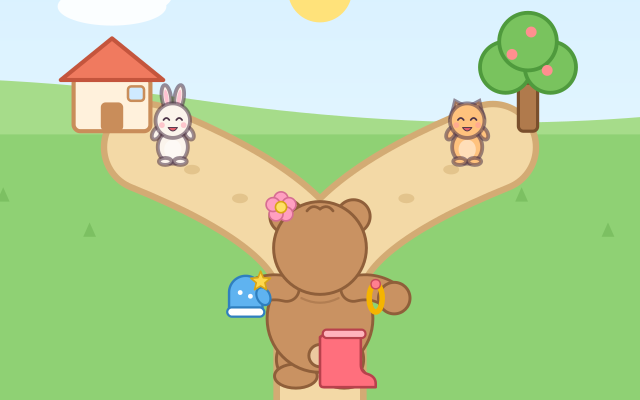
Little Bear is going for a walk! Your child listens to what Bear needs and helps with one tap: "Put a rain boot on Bear's left foot!", "Bear goes right!", "Who sits on Bunny's left?". When it's right, the boot flies onto Bear's foot, Bear walks down that path and meets a friend, or the friend turns around and waves.
There are 4 walks, starting with the easiest. Walk 1, Get Dressed: Bear stands with its back to us, so its left and right are the same as your child's; tap Bear's ears, hands and feet to give it mittens, boots and a flower. Walk 2, Which Way?: one left-or-right choice at each fork. Walk 3, Who Sits Where?: the animals sit on a bench watching the sunset, backs to us, and your child finds the friend on someone's left or right; there is always exactly one answer. Walk 4, Face to Face: Bear turns to face us, and its right hand is now on our left.
Face to face is where many grown-ups get mixed up too, so there is a "Turn around" button: Bear turns its back to us, puts a star sticker on the hand (or foot, or ear) we are looking for, and turns back, and your child sees the star move to the other side. The lower corners always show "your left hand" and "your right hand", with a star on the left one, so your child can hold up their own hands to compare.
Each walk has 5 questions. Clothes and things to hold, the scenery at each fork, the friends on the bench and the questions are mixed again every time. Each finished walk gives a walk sticker.
How to play
- Tap "Play!" and pick a walk (walk 1 is the easiest; walk 4 is face to face). The 5 stars at the top show how far along the walk you are.
- The message card at the bottom says what to do. Tap it to hear it again.
- Getting dressed and face to face: tap Bear's ear, hand or foot. When it's right, the thing flies on; otherwise Bear says something like "That is Bear's right hand. Let's find the left hand!" and your child taps again.
- Forks: tap the left or the right path (anywhere on that half of the picture). The bench: tap that friend; anyone else turns around and says which side they sit on.
- After two other taps on the same question, the answer glows or hops. Not sure in face to face? Tap "Turn around". After 5 questions you get a walk sticker; play again, go on to the next walk, or go back to the walks.
Controls
- Phone / tablet: one tap at a time. Tap Bear's ear, hand or foot, the left or right path, or a friend. The whole picture counts (the left half is left, the right half is right), with no dragging, holding or timing.
- In "Face to Face", tap the yellow "Turn around" button: Bear turns to show where its left and right are, then turns back.
- Tap the message card to hear it again (on devices that have a voice). Buttons and walk cards are at least 64 px.
- Keyboard: 1–4 start a walk on the walk screen; at a fork, ← → pick left or right; elsewhere ← → move the blue ring and Enter picks; with no ring, Enter repeats the message; H turns Bear around; Esc goes back to the walks.
For parents
- Made for ages 3–5: telling left from right. Left and right come later than up/down or front/behind because they have no fixed direction (gravity keeps "up" up, but left and right turn with your body); most children are steady at 5–7, and swapping someone else's left and right when facing them comes later still. The game follows that order: first your own body (Bear has its back to us, so its left and right match your child's), then the direction you walk, then someone else's left and right, and face to face last.
- While playing, ask your child to hold up their own left hand to compare, or put a small sticker on the back of their left hand (just like the hand with a star in the corner of the screen). Practice in daily life too: "left shoe first", "we turn right at the corner", "who is sitting on your right?". For face to face, turn around together so you both face the same way and look again, which is exactly what "Turn around" does in the game.
- There is no losing, no score and no timer. After a wrong tap, Bear or the friend just says which side that is and asks again, and after two tries the answer glows or hops. Taps don't need to be precise: the whole picture is divided up (the left half is left, the right half is right), and buttons are at least 64 px. The message card can be read aloud by the device's voice with a tap. There is no chat, no in-app purchases, no ads and no outbound links, and no name or personal information is ever asked for.
- Only which walks have been played (and how often) and the sound setting are remembered, in this device's browser; the game still works if saving is blocked. The speaker button switches off both sounds and read-aloud, and the game also works offline.