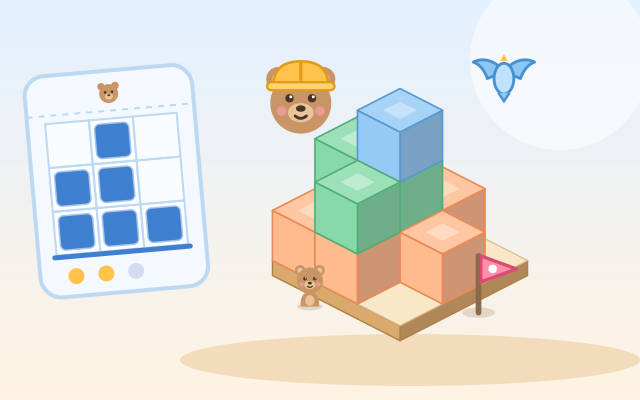
A block game about solid shapes and their views. The building site is a 3 × 3 table you can turn 90° at a time, looking down from any of its four corners. A bear stands at the front, a little flag on the right, and a bird flies above: what the bear sees is the front view, what the flag side sees is the side view, and what the bird sees looking down is the top view. Children tap the floor or a block to stack blocks one by one, up to 3 per column, and build what the blueprints show.
Five chapters of six rounds: (1) Copy the Model: the model card turns with the table, and in the last two some blocks hide behind tall columns until you turn around; (2) From Another Side: the model card is drawn from another corner, so find the bear and flag on the card and turn the table to match before building; (3) Front and Side: only the bear’s or the flag’s squared drawing, then both together; (4) Three Blueprints: the bird’s top view is added, and the last two rounds ask for the most and the fewest blocks; (5) Draw What You See: the other way round, the building is ready and children draw its front, side or top view on squared paper.
Buildings are generated every time, and random practice mixes all chapters. While building, the blueprints compare live: matching squares are filled, missing ones are dashed, extra ones are crossed out, and a matching blueprint gets a tick. One front and side pair often fits several buildings, and any that looks right counts. Square states are shown as filled, dashed and crossed, and block colours are only decoration, so color is never needed.
How to play
- Press Play!, or open Chapters and pick one: Copy the Model, From Another Side, Front and Side, Three Blueprints, Draw What You See. Random practice is there too.
- The bear’s speech bubble tells you the job. In chapters 1 and 2 you copy the model card; in chapters 3 and 4 you build from the squared blueprints labelled Bear sees, Flag sees and Bird sees. Tap the floor or a block to add one, switch to Take off and tap to remove one, and press the arrows in the table’s corners to turn it and look at the back.
- When your building matches the model, or every blueprint has a tick, the round is done: press Next. In chapter 5 the building is ready: draw it on the squared paper and press Done!; a wrong drawing is not a failure, the dashed and crossed squares show what to change.
- Rounds finished without a hint earn a star. Each chapter has 6 rounds, and the end card shows the six buildings and the big idea of the chapter. There is no timer.
Controls
- Phone / tablet: everything is a tap. Pick Add below, then tap the floor or a block on the table to put one more block on that column (up to 3); pick Take off, then tap a block to take one off that column. The broom clears the table, but only when pressed twice.
- The round arrows at the top corners of the table turn it 90° left or right, so you can look from all four corners; blocks hidden at the back show up when you turn. In chapter 5, tap the squared paper: for the front and side views, tap how many squares high a column goes (tapping its top square lowers it by one); top-view squares turn on and off. Press Done! when the drawing is ready.
- The light bulb at the top is a hint: an arrow appears over the column to add to or take from, or the square to change on the paper glows.
- Mouse: click the buttons, the table and the squares, just like tapping.
- Keyboard: arrow keys move the dashed cursor on the table, Space or Enter uses the current tool, + adds and Backspace or − takes off a block, T switches tools, Q / E turn the table; on the squared paper, Tab to a square and press Space; Enter is also Done! and Next, H for a hint, M for sound on/off, Esc for the menu.
For parents
- Designed for ages 6–8, it covers solid shapes and spatial sense from the early school years: the same object looks different from different directions, and solid block buildings turn into flat views (front, side and top) and back. Instead of picking an answer from pictures, children build with their own hands on a table that turns, and see at once how each block changes the three views.
- The chapters build the idea step by step: copy a model seen from the same angle, and find that some blocks hide until you look from somewhere else; use the bear and the flag on a card to work out which way it faces and turn the table to match (a first step toward mental rotation); build from only the front or side squared drawing and see that the front view shows the tallest column in each row; add the top view and compare the most and fewest blocks one set of views allows; and finally go the other way and draw the views of a building. A set of views often fits several buildings, and the game accepts any of them, with gentle reminders in the most / fewest rounds.
- No timer and no failure: every round gets finished; finishing without a hint earns an extra star. Squares are told apart as filled, dashed or crossed, so children with color vision differences can play too. No chat, in-app purchases, ads or outbound links, and nothing to type in. Finished chapters, stars and the sound setting are stored only in this device’s browser; sound can be turned off.