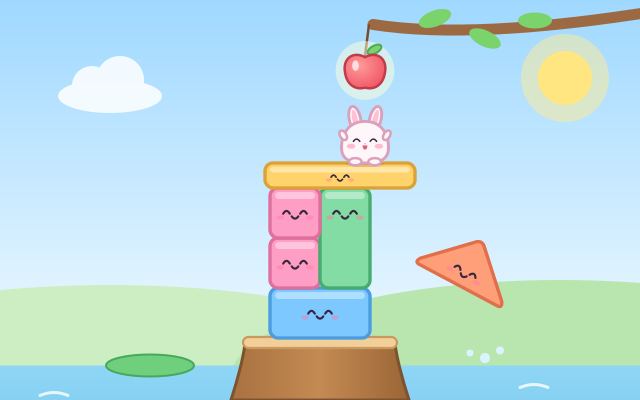
Bunny wants the apple hanging from a branch, the kite stuck on a cloud, the floating balloon… but it is all too high! In the middle of the pond stands a tree stump. Children pick cubes, bricks, long planks, tall columns, arches and roofs from the tray and drop them above the stump, where they fall and stack up. A see-through bunny and a dashed line show how high and where to build. When the top of the tower reaches that height, Bunny hops up step by step, grabs the prize and puts it in the treasure box.
Blocks have to sit steadily. With its weight over the block below, a block stays put. Near the edge it wibbles and wobbles but stays up. Too far out and it tumbles into the pond, then flies back to the tray as a little star. The tower that is already built never falls down because of it. Roofs are slippery and nothing stays on top of them: another little rule children can discover for themselves. In later towers the prize hangs beside the stump, so a long plank has to reach out to it.
After getting the prize, "Knock it down!" sends the whole tower crashing into the pond, and a new goal appears. Towers are generated by the game, so the height, the position and the blocks on offer change every time, and play never runs out. There are 6 treasures to collect: apple, balloon, kite, star, carrot and butterfly.
How to play
- Tap "Build!". The message at the top says what Bunny wants, and the see-through bunny on the white dashed line shows how high and where to build.
- Take a block from the tray at the bottom, drag it above the stump and let go (or tap the block, then tap a spot). While you hold it, a dashed outline shows where it will land.
- A block sits steadily when it is close to the middle of the block below. Too near the edge and it rolls into the pond, but it comes back to the tray by itself and the tower stays standing, so just try another spot.
- To move a block, press a block at the top of the tower with nothing on it, pick it up and place it again, or drag it back to the tray.
- When the top reaches the dashed line, Bunny climbs up and grabs the prize. Tap "Knock it down!" to topple the tower and build the next one. The pink knock-down button can topple the tower any time.
- The yellow box button on the title screen opens the treasure box, which counts how many times each treasure was collected.
Controls
- Phone / tablet: press a block in the tray at the bottom, drag it above the tree stump and let go. It drops and lands on the tower. You can also tap a block and then tap where it should go.
- A block at the top of the tower with nothing on it can be picked up again and moved. Drag it back to the tray to put it away.
- Mouse: drag the same way, or click a block and then click a spot.
- Keyboard: number keys 1–4 choose a block, ← → move it, ↑ switches to the next block, and Enter, Space or ↓ drops it. After Bunny gets the prize, Enter knocks the tower down. Esc returns to the title.
For parents
- Made for ages 3–5, with long planks and counterweights for 6–8 year olds to try. Building with blocks lets children feel for themselves that a block is steady when its weight is over what holds it up, that weight on top makes things lean, that nothing stays on a triangle, and that an arch can stand over another block. They also practise judging height and position, hand–eye coordination and careful dragging. Try asking "Why did that one fall?" or "Where would it be steadier?"
- There is no losing, no timer and no score. A badly placed block just rolls into the pond and comes back to the tray, one block can never knock down the tower that is already built, and there are always more blocks. The tower only falls when the child presses "Knock it down!", as a fun reward. Buttons and tray slots are at least 64 pixels, and blocks can be dragged or placed with two taps. There is no chat, no in-app purchases, no ads and no outbound links, and no name or personal information is ever asked for.
- Only the current tower number, how many of each treasure were collected and the sound setting are remembered, in this device's browser (the game still works if saving is blocked). Sound can be switched off with the speaker button, and the game also works offline.